
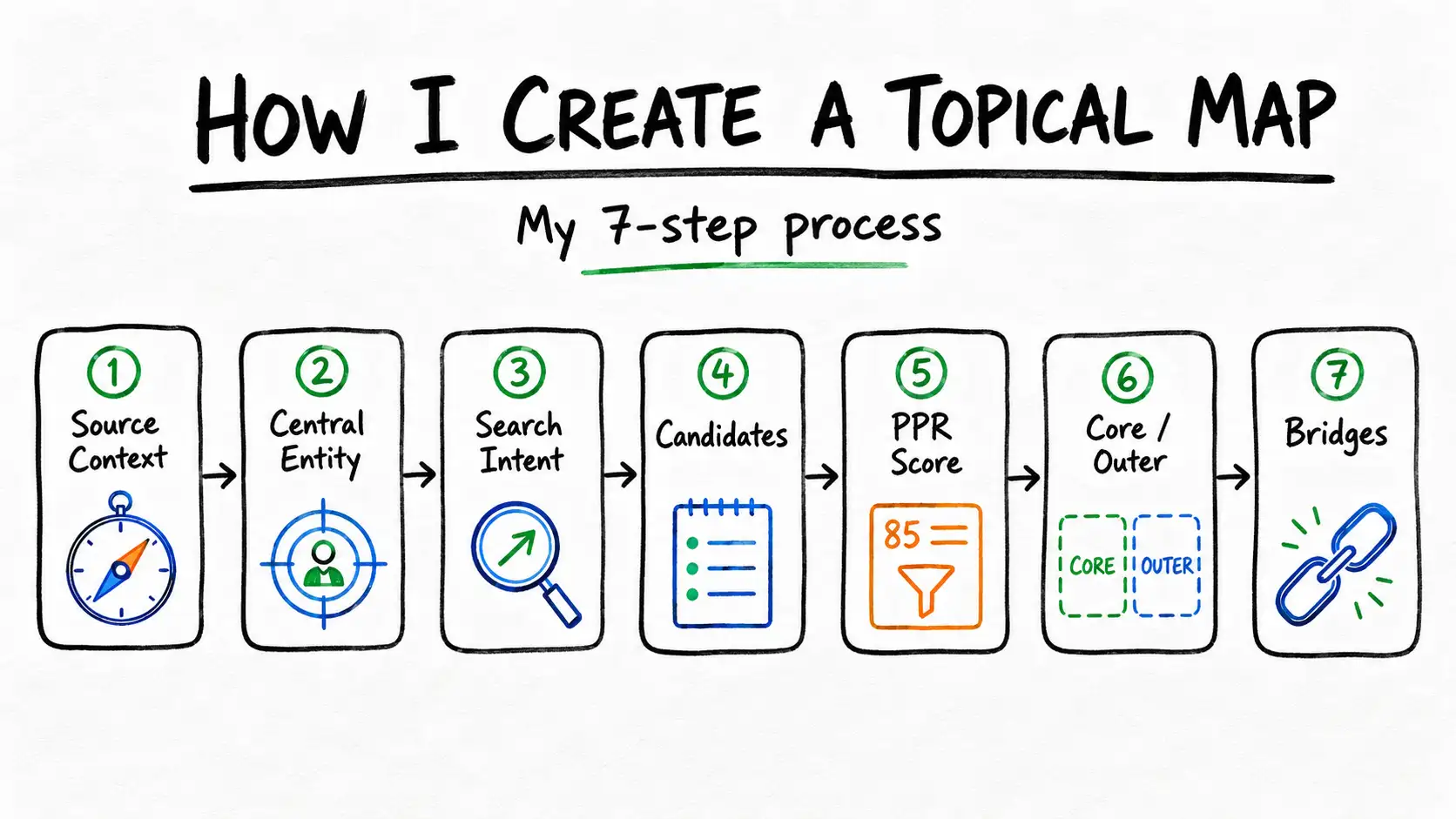

I follow the same 7 steps on every topical map I build, defining Source Context, Central Entity, and Central Search Intent, generating candidate topics, scoring every one with the PPR method, and placing each into the Core Section or Outer Section, connected through bridges. I’ve run this process on client sites across e-commerce, SaaS, local services, and affiliate publishing, and it holds regardless of the business.
Why I Don’t Just Cluster Keywords
Most guides I’ve read online describe some version of the same 4 steps: pick a topic, research subtopics with a keyword tool, group results into clusters, build pillar and supporting pages. I understand why, it’s simpler to explain and it produces something that looks organized. But it doesn’t produce a topical map, because nothing in that process actually tests whether a topic belongs on a specific site.
The difference in my process comes down to one thing: I test every candidate topic against Source Context and score it before it earns a place on the map. Keyword research still matters, I use it, but it’s one input among several, and it never makes the decision on its own.
Step 1 — I Define Source Context
Source Context comes first because it’s the standard I test every later decision against, the client’s business model, monetization method, and audience. I write one clear sentence covering all 3 before I move on.
For a project management SaaS client: a SaaS company selling project management software on a monthly subscription, targeting small-to-mid-size teams.
Read more about how I define Source Context on my blog.
Step 2 — I Define Central Entity
Central Entity is the one subject every page on the client’s site will relate back to. I choose it deliberately before I generate a single candidate topic. For the SaaS client, the Central Entity is project management software, one subject, every page connects to it through a defined attribute.
Step 3 — I Define Central Search Intent
I combine Source Context and Central Entity into one governing statement, the verb-plus-noun purpose every candidate topic gets tested against. For the SaaS client, that’s evaluate and adopt project management software, not just “buy,” because I’ve learned that narrow phrasing misses onboarding and workflow content that still serves the same business.
I always check my first phrasing against the client’s real scope before I lock it in. If the obvious version only describes the transaction, I widen it until it captures the full reason someone actually engages with the site.
Step 4 — I Generate Candidate Topics
I pull candidates from 3 sources, and none of them decides what makes the final map on its own. That decision happens in Step 5.
Attribute Mapping
I list every attribute connected to the Central Entity. For project management software: task tracking, team collaboration, reporting, integrations, pricing tiers, onboarding, mobile access. Each attribute seeds multiple candidate topics.
Competitor Gap Analysis
I check what ranking competitors cover that my client doesn’t, and what nobody covers well. Both become candidates worth testing.
Query Fan-Out
I expand each attribute into the actual phrases people search. “Project management software pricing” fans out into pricing comparisons, pricing by team size, and pricing for specific industries.
I always generate more candidates than I expect to keep. Over-generating here costs nothing, since Step 5 filters out anything that doesn’t belong.
Step 5 — I Score Every Candidate with PPR
I score every candidate on Prominence, Relevance, and Popularity, then combine them with the same formula on every project:
PPR Score = (Prominence × 0.40) + (Relevance × 0.40) + (Popularity × 0.20)
A topic scoring high on Prominence and Relevance but modest on Popularity still qualifies. A topic with strong search volume but weak Relevance gets cut, no exceptions. This is the step I spend the most time on, because it’s where judgment actually matters, not the tool.
Step 6 — I Place Topics into Core or Outer Section
Topics that clear the threshold with the strongest Prominence and Relevance go into the Core Section, the pages close to a buying decision. Topics that clear it with moderate scores, supporting the Central Entity without converting directly, go into the Outer Section.
Read more about how I structure Core and Outer Sections on my blog.
Step 7 — I Connect Sections with Bridges
I connect Core and Outer Sections through bridges, internal links placed because the topics genuinely relate, not because a sitemap needed one more connection. An Outer Section page about sprint retrospectives links to the Core Section page about team collaboration features, because the topics are actually connected.
A Complete Walkthrough From a Real Project Type
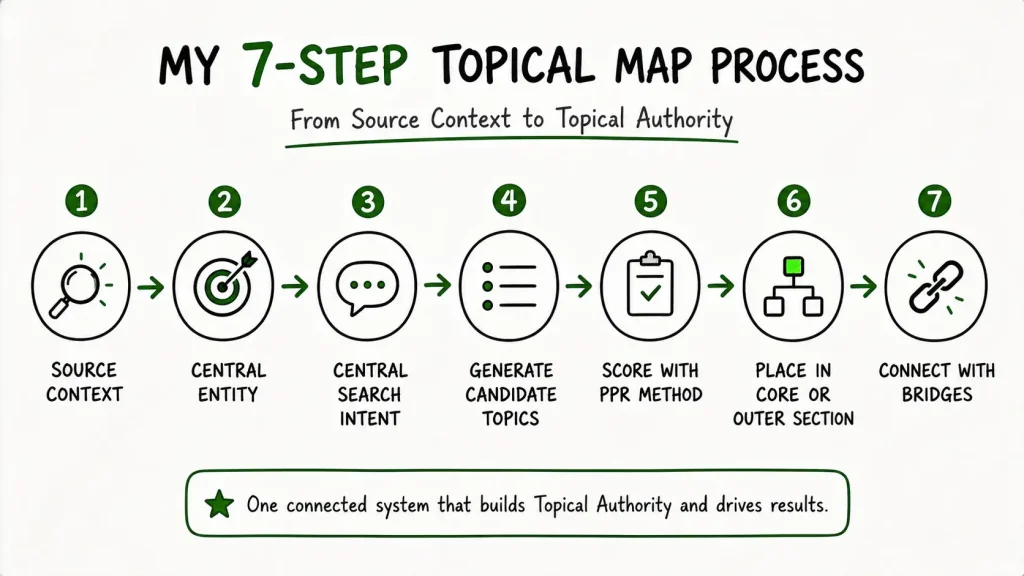
Here’s how all 7 steps play out on an actual client type I work with regularly, a project management SaaS company. I’m showing the full sequence here because most guides stop at “research subtopics” and skip the scoring that actually determines what makes the map.
The Client
A SaaS company selling project management software on a monthly subscription, targeting small-to-mid-size teams.
Steps 1 to 3: The 3 Governing Inputs
Source Context: SaaS, monthly subscription, small-to-mid-size teams.
Central Entity: Project management software.
Central Search Intent: Evaluate and adopt project management software.
Step 4: Candidates I Generated
- Best Project Management Software for Small Teams
- Project Management Software Pricing Comparison
- How to Write a Project Charter
- Remote Team Communication Best Practices
- How to Improve Work-Life Balance
Step 5: How I Scored Them
| Topic | Prominence | Relevance | Popularity | PPR Score |
|---|---|---|---|---|
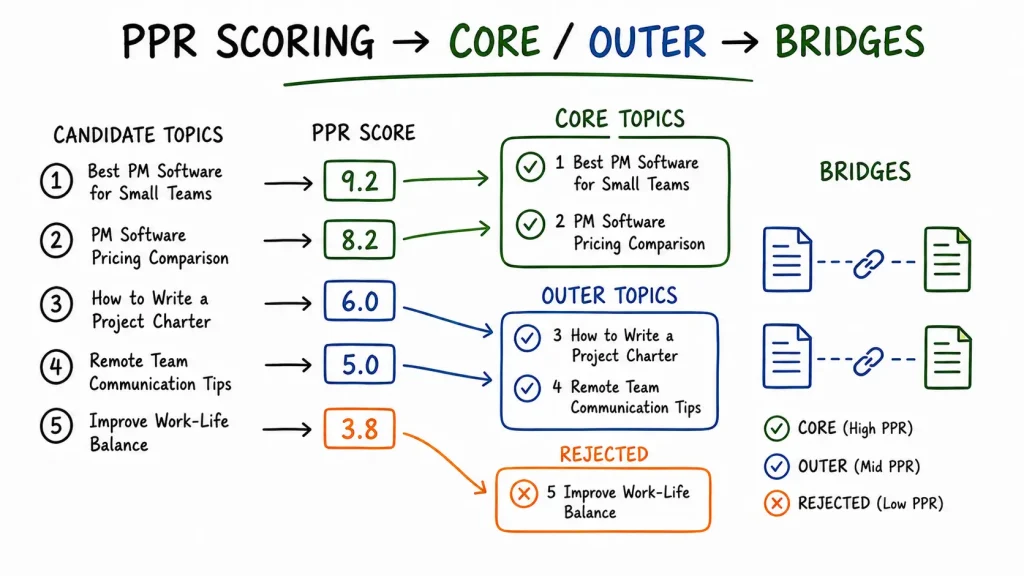
| Best Project Management Software for Small Teams | 9 | 10 | 8 | 9.2 |
| Project Management Software Pricing Comparison | 8 | 9 | 7 | 8.2 |
| How to Write a Project Charter | 5 | 7 | 6 | 6.0 |
| Remote Team Communication Best Practices | 4 | 6 | 5 | 5.0 |
| How to Improve Work-Life Balance | 2 | 3 | 8 | 3.8 |
That last one always comes up on client calls. Work-life balance content gets real search volume, and I understand the temptation. But it scores 3.8, Relevance too low, and I cut it every time. This is the exact decision that separates a topical map from a keyword list dressed up as one.
Step 6: Where I Placed Them
Core Section: Best Project Management Software for Small Teams (9.2), Project Management Software Pricing Comparison (8.2).
Outer Section: How to Write a Project Charter (6.0), Remote Team Communication Best Practices (5.0).
Rejected: How to Improve Work-Life Balance (3.8).
Step 7: The Bridges I Built
The project charter guide links to the pricing comparison page, a reader planning a project is a plausible evaluator of the tool itself. The remote communication guide links to the best-software comparison, same logic, genuinely related audience.
How Long This Actually Takes Me
A smaller map, 30 to 60 topics, takes me 5 to 10 business days. Larger maps take longer in proportion to how many candidates need scoring. Steps 1 through 3 go fast, a few hours, they’re judgment calls, not volume work. Steps 4 and 5 take the most time, every candidate needs research and 3 separate scores before I can place it. Steps 6 and 7 move quickly once scoring is done, the scores mostly decide placement for me.
The Mistake I See Most Often
Skipping Source Context. I’ve taken over accounts where someone started with a keyword list and never defined Source Context at all. Every topic on that kind of map is a guess, because nothing was there to test relevance against.
Scoring on Popularity alone. The work-life-balance topic in my walkthrough above is the perfect example, strong demand, weak relevance, cut. Popularity is only 20% of my formula for exactly this reason.
Building the Outer Section ad hoc. I’ve inherited Outer Sections that repeat the same 2 attributes 4 times while whole categories go untouched. I always do a systematic pass against every attribute before I call that section finished.
Want This Process Applied to Your Site?
Every map I build follows these exact 7 steps, Source Context through bridges, scored with PPR, nothing skipped. If that’s what you want for your site, see my semantic SEO consulting page .
Work With MeFrequently Asked Questions
What’s the first step in your process?
Defining Source Context, before Central Entity, before any candidate topic. It’s the standard I test everything else against, so it has to come first.
Do you rely on a keyword tool to build the map?
I use one for candidate generation and for the Popularity input in PPR scoring, but it’s only 20% of the formula. Prominence and Relevance require judgment a keyword tool can’t apply.
Can AI do this for me?
AI speeds up candidate generation, I use it for that. It can’t reliably define a client’s Source Context or apply PPR scoring with real judgment, both need manual review before I finalize anything.
How many candidates do you usually generate before scoring?
More than I expect to keep. Over-generating costs nothing, since scoring filters out what doesn’t belong.
Do you build the map before or after the site exists?
Before, whenever possible. A topical map determines what has to exist. Mapping an existing site afterward usually surfaces gaps that need restructuring.
Can a topical map change after you deliver it?
Yes. If a client’s Source Context or Central Entity shifts, a new product line or market, I go back and rescore the affected topics.
Propagate the Intel

Transmission Feed